← Back to the guide
Copilot Chat (Basic) · Handout — All roles

Prepared for Bunzl Distribution

CC

Copilot Chat basic

Your pocket companion — a quick-reference and practice guide for the secure AI workspace included with Microsoft 365. No extra license required.

Enterprise Data Protection. When you see the green shield, your prompts and responses stay inside the Microsoft 365 service boundary and are never used to train foundation models.

Where to access Copilot Chat

🌐 m365copilot.com primary web
🔲 Microsoft Edge sidebar
📧 Outlook side pane
💬 Teams left nav
📱 Mobile app iOS & Android
🖥️ M365 Copilot desktop app
Full interactive guide: intelligenceamplified.work/guides/customer/bunzl

The interface

Know your way around

Fourteen things worth finding the first time you open Copilot Chat.
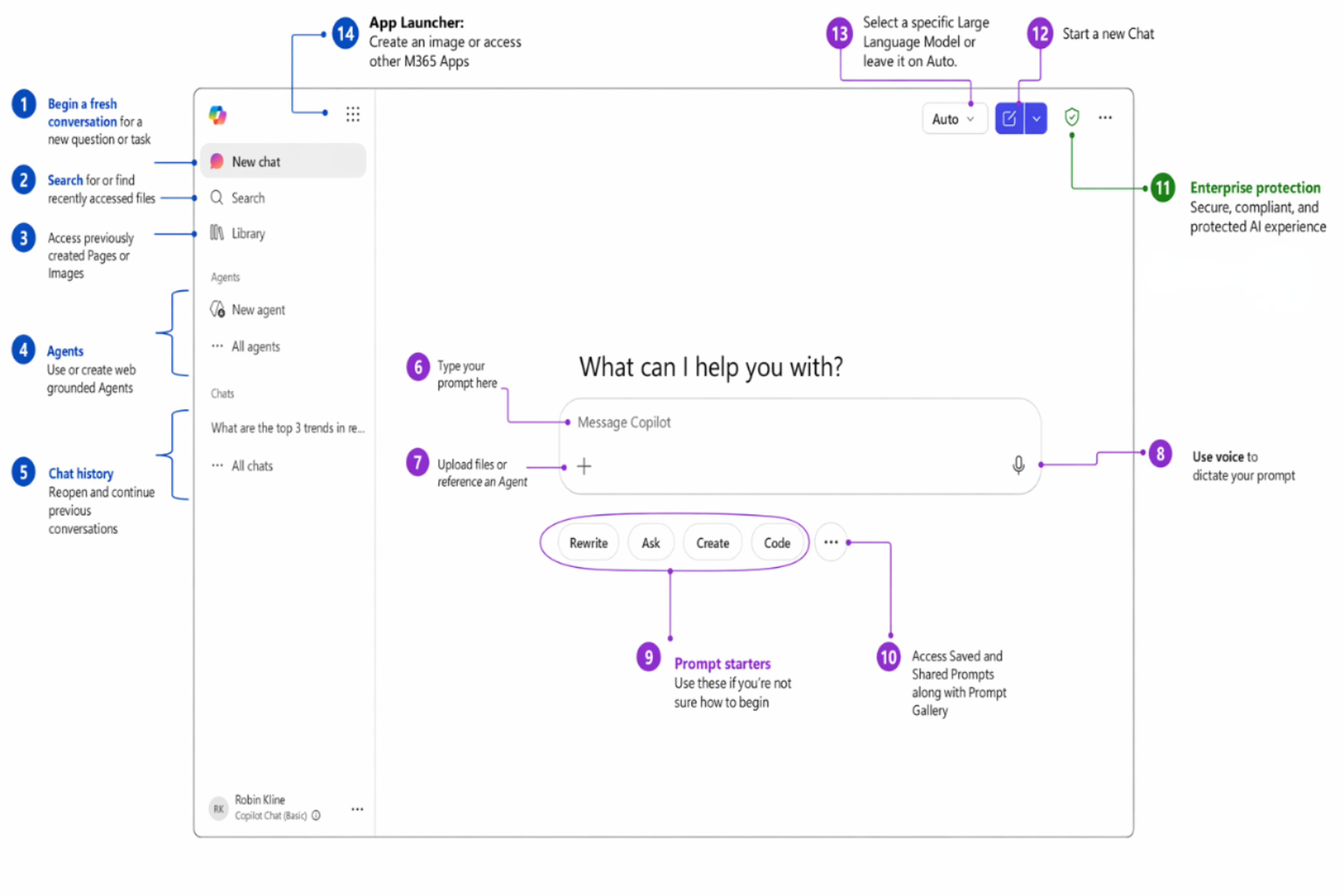
Annotated Copilot Chat interface with 14 numbered features
  1. New chatStart a fresh conversation with no prior context.
  2. SearchFind past chats, prompts, and content across Copilot.
  3. LibraryYour saved prompts and reusable pages in one place.
  4. AgentsSpecialized assistants for specific apps and tasks.
  5. Chat historyRevisit and continue earlier conversations.
  6. Prompt boxWhere you type your request to Copilot.
  7. File uploadAttach a document or image for Copilot to use.
  8. VoiceSpeak your prompt instead of typing it.
  9. Prompt startersSuggested prompts to spark ideas fast.
  10. Saved promptsReusable prompts you've pinned for quick access.
  11. Enterprise protection shieldConfirms your data stays in the secure M365 boundary.
  12. New chat buttonClear the screen and begin again in one click.
  13. Model selectorSwitch between fast answers and deeper reasoning.
  14. App launcherJump to your other Microsoft 365 apps.

Make it yours

Personalize Copilot once, benefit every time

Custom Instructions

Set persistent preferences that apply to every conversation — like training Copilot on your working style. Set it once; every response reflects it.

How to set it up

  1. Open the ⋯ menu (top right) → Settings
  2. Go to Personalization
  3. Toggle on Custom instructionsEdit instructions
  4. Type your preferences (or click a suggested chip)
  5. Click Save instructions
Bunzl example I'm a Bunzl account manager. Keep responses concise and action-oriented. Focus on distributor–customer conversations, true case cost, and supply continuity.

Saved Memories

Copilot learns context about you over time — your accounts, role, and goals — so it gives more relevant answers without you repeating yourself.

How to manage

In any chat, say "Add the following to memory: …". Review or remove entries under ⋯ → Settings → Personalization → Manage saved memories.

Great things to save: the customers and channels you cover, your role and division, the product categories you distribute, your preferred communication style, and recurring meeting cadences. The more Copilot knows about your work, the less prompting you need.

The framework

GCSE — the anatomy of a great prompt

G
GoalWhat you want Copilot to do.
C
ContextBackground, audience, or situation.
S
SourceFiles, data, or references to use.
E
ExpectationsFormat, tone, length, and structure.

Watch a prompt get better

Good

Help me prepare talking points for a customer account review.

Better

I'm a Bunzl account manager meeting with the procurement lead at a regional grocery chain to discuss consolidating more of their packaging, can liner, and janitorial supply spend with us for Q3. Create 5 talking points covering true case-cost savings, our 60,000+ item single-source assortment, our fill-rate and on-time delivery performance, and the working-capital benefits of our vendor-managed inventory program. Use a consultative, partnership-focused tone that positions Bunzl as a supply-chain partner, not just a vendor.

Best

I'm a Bunzl account manager preparing for a quarterly business review with the procurement director at FreshMart Grocery, a 200-store regional chain. Bunzl is their primary distributor for foodservice disposables, can liners, and janitorial supplies, and we've been consolidating more of their nonfood spend over the past year. Review /FreshMart-Q2-Account-Review.xlsx for the latest case volume, fill-rate, and cost-savings data and create 5 talking points covering: documented true case-cost savings we've delivered this quarter, our fill rate and on-time delivery vs. SLA, two SKU-consolidation or sustainable-swap opportunities for Q3, and one supply-risk area we can help them de-risk. Format as a numbered list with a one-sentence executive summary at the top. Keep the tone confident but collaborative — this customer values data and brevity.

Notice how each step adds Goal → Context → Source → Expectations. You rarely nail it on the first try — that's normal. Iterate.

Quick reference

The cheat sheet

7 rules for better prompts

  • 1
    Let it interview youFor complex or context-heavy prompts, ask Copilot to pose 5 clarifying questions before it answers — then it builds on your goal instead of guessing.
  • 2
    Break it downMulti-step prompts beat one complex prompt. Review and refine between steps.
  • 3
    Assign a personaTell Copilot who to 'be' for more specialized, targeted answers.
  • 4
    Ask what it needsWhen stuck, ask Copilot what context would help most.
  • 5
    Think end-to-endDon't just ask for a table of action items — ask for the whole follow-up email that includes it.
  • 6
    ExperimentTry different structures, tones, and follow-ups. Curiosity reveals new capability.
  • 7
    Iterate alwaysYour first result is a draft, not a final answer. Refine, adjust, repeat.

6 power techniques

  • Keep the conversation goingBuild on what Copilot gave you with follow-ups — don't start over.
  • Give specific instructionsTell Copilot what to include AND what to leave out.
  • Break it into stepsStage complex tasks instead of cramming everything into one prompt.
  • Assign a personaTell Copilot who to 'be' for specialized, targeted answers.
  • Use templates of goodGive Copilot an example document to follow for structure and tone.
  • Ask Copilot what it needsWhen you're stuck, let Copilot help you write the prompt.
Open Copilot Chat m365copilot.com
Full guide · intelligenceamplified.work/guides/customer/bunzl
👔

Role add-on

Executive · a day in the life

Briefings, board prep, company comms, and strategic thinking.

8:00 AM

☀️Morning Briefing

Paste overnight news and get an instant, decision-ready briefing.

PromptSummarize the top 5 news stories from today related to the foodservice packaging and distribution industry, grocery and convenience-store retail trends, and supply-chain or commodity cost shifts (resin, paper, freight). Focus on anything involving major North American distributors or our customers, single-use plastics regulation, or sustainability mandates. Format as a numbered list with one sentence per story and a brief 'why it matters for Bunzl' note for each.
10:30 AM

📊Meeting Prep

Turn metrics into board-ready talking points.

PromptI'm the VP/GM of a Bunzl distribution division preparing for our quarterly executive leadership meeting. Our key metrics this quarter: [e.g., $320M revenue, 9% YoY growth, 97.5% fill rate, 22 new accounts won]. Create 5 talking points that address: year-over-year revenue growth by customer segment (grocery, food processor, c-store, retail), gross-margin and true case-cost trends, fill rate and on-time delivery vs. SLA, new-account wins and at-risk renewals, and our warehouse capacity and automation plan for H2. Keep the tone confident and data-driven. Format as a bulleted list with bold headers.
1:00 PM

✉️Communication

Draft a clear, energizing company-wide announcement.

PromptDraft an email to our field sales organization announcing the launch of a new vendor-managed inventory (VMI) program for convenience-store accounts in the Southeast region. The audience is account managers, regional sales managers, and our customer service team. Strike a tone that's energizing but clear — explain why we're rolling out VMI, what it means for their accounts, and what support and training they'll receive. Keep it under 300 words with a clear call-to-action to attend a kickoff webinar.
4:00 PM

🧠Strategic Thinking

Switch to Think Deeper for second-order competitive analysis.

PromptThink deeper: Sustainability mandates and single-use plastics regulations are accelerating across the states our customers operate in, and more customers are asking for compostable and recycled-content alternatives. Analyze what this trend means for Bunzl's distribution business over the next 12 months. Consider product assortment and sourcing implications, true case-cost and margin trade-offs, our advantage as a material-agnostic distributor, customer-retention leverage, and where we should invest to lead on sustainable alternatives. Format as a structured analysis with headers for each area.
📋

Role add-on

Manager · a day in the life

Standups, documentation, coaching, and reporting.

8:30 AM

☀️Team Standup Prep

Generate a reusable huddle agenda in seconds.

PromptCreate an agenda for a 15-minute Monday morning huddle with my team of 8 account managers covering grocery and convenience-store customers. Include sections for: last week's wins (new accounts won or cost-savings delivered), this week's priorities (customer business reviews, site visits, or VMI rollouts), and any blockers needing escalation (backorders, pricing issues, service complaints). Format as a reusable template. Keep each section to 2-3 bullet points max.
11:00 AM

📝Documentation

Turn raw meeting notes into structured action items.

PromptI just finished a 45-minute joint business planning session with the [e.g., Kroger] procurement lead about their packaging and janitorial supply program. Here are my notes from the meeting: [paste your meeting notes here]. Transform these into a professional meeting summary with three sections: Key Decisions Made (table format), Action Items (table with Owner, Task, Due Date columns), and Open Questions for the Next Review (bulleted list).
2:00 PM

👥People Management

Build a fair, growth-oriented feedback template.

PromptI'm a regional sales manager preparing for quarterly performance reviews with my team of [e.g., 8] account managers covering [e.g., grocery and convenience-store] customers. Create a structured feedback template tailored to distribution sales that includes: Sales Performance & Impact (3 bullets covering revenue/quota attainment, new accounts won, and cost savings delivered to customers), Growth Opportunities (2 bullets with specific development actions like customer business-review skills or category/VMI knowledge), Goals for Next Quarter (3 measurable goals tied to revenue, account retention, and customer satisfaction), and a Coaching Notes section. Use a supportive and growth-oriented tone.
4:30 PM

📊Reporting

Synthesize raw numbers into an executive summary.

PromptCreate a Q2 territory performance summary for my VP of Sales. Our team of [e.g., 8] account managers covers [e.g., 1,200] grocery and convenience-store customers across the [e.g., Midwest] region. Here are our key numbers: [paste your quarterly metrics or upload your performance spreadsheet]. Include sections for: Key Metrics (format as a table with Metric, Target, Actual, % to Goal columns — include metrics for revenue, fill rate, new accounts won, and cost savings delivered), Top Achievements (3-4 bullets highlighting specific account wins), Challenges & Mitigations (2-3 bullets about competitive threats or service gaps), and Priorities for Q3 (numbered list). Keep the tone professional and results-focused.
💼

Role add-on

Individual Contributor · a day in the life

Email triage, research, content creation, and document review.

8:00 AM

☀️Email Triage

Sort a heavy inbox into priority tiers fast.

PromptI have [e.g., 40+] unread emails from the past 3 days related to my customer accounts, supplier communications, and internal updates. Here are the subject lines and senders: [paste your email subject lines and senders here]. Categorize them into three priority tiers: 🔴 Respond Today (customer order issues, backorder alerts, pricing requests), 🟡 Respond This Week (business-review scheduling, new item setup requests, supplier check-ins), and 🟢 FYI Only (corporate newsletters, HR updates, training announcements). Format as a table with columns for Priority, Subject, Sender, and Suggested Action.
10:00 AM

🔬Research

Run fast, public-info competitive analysis.

PromptI'm preparing for an account review with the procurement lead at [e.g., FreshMart Grocery]. Using publicly available information, compare how Bunzl and our top 2 distribution competitors — [e.g., Veritiv and Imperial Dade] — position our offerings in foodservice packaging and janitorial supply. Create a comparison framework with columns for Company, Market Focus, Service Model, Sustainability Positioning, and Potential Weakness. End with 3 talking points on why consolidating more spend with Bunzl would lower their true case cost.
1:30 PM

✍️Content Creation

Draft long-form content with a precise audience.

PromptWrite a compelling one-page sales story for my top prospect — [e.g., a 50-store regional grocery chain] that currently uses several different suppliers. Target audience: the VP of Procurement who values cost savings and supply reliability. Include sections for: Why Bunzl (3 bullets on single-source consolidation, our 60,000+ item assortment, and our nationwide distribution footprint), Customer Impact (2 bullets on lowering true case cost and freeing up working capital), and Service & Support (3 bullets on vendor-managed inventory, fill-rate performance, and sustainable product alternatives). Use a professional, consultative tone. Keep it under 400 words.
3:30 PM

📄Document Review

Get structured feedback on a proposal or report.

PromptReview the attached supply proposal for our Q3 [e.g., Kroger] program and provide structured feedback. Identify: 3 strengths of the proposal, any gaps in the cost-savings projections (missing line items, unrealistic assumptions, or incomplete service-level detail), suggestions to strengthen the executive summary for the customer, and any risks around implementation timing or inventory readiness that aren't addressed. Format your feedback as a table with columns for Section, Finding, and Recommendation.
🏭

Role add-on

Frontline / Warehouse · a day in the life

Shift prep, quick reference, incident reports, and training.

6:00 AM

☀️Shift Prep

Generate an opening checklist for your DC.

PromptCreate a comprehensive shift-opening checklist for a warehouse supervisor at a distribution center. Include sections for: Safety & Compliance (4 items — check forklift inspections, verify clear aisles and dock areas, confirm PPE availability, review any open incident reports), Inbound & Putaway (4 items — verify overnight receipts, check for damaged pallets, confirm putaway locations, flag temperature-sensitive items), Outbound & Pick N Pack (3 items — review today's order volume, confirm staffing by zone, check for backorders or substitutions), and Communication (3 items — brief the team on priorities, note any equipment issues, log the shift handoff). Format each item as a checkbox-style line. Keep the language simple and action-oriented.
9:00 AM

📋Quick Reference

Get a plain-language explanation of a policy.

PromptDraft a simple, customer-friendly explanation of a standard product return and credit policy for distribution customers. Cover these scenarios: damaged product found on delivery, product past its expiration date, product recalled by the manufacturer, and overstock or discontinued items. Format as a quick-reference card with each scenario as a separate section including What to Do and Who to Contact. Use a helpful, professional tone I can reference while talking to a customer — and if I paste our actual policy, tailor it to match.
12:30 PM

📝Incident Reporting

Draft a structured incident report on the floor.

PromptHelp me write a warehouse incident report. Details: At [e.g., Distribution Center #12] today, [describe what happened, e.g., a loaded pallet shifted off a forklift in the outbound staging area]. [describe any injury or damage, e.g., no injuries, but two cases were damaged and an aisle was blocked for about 20 minutes]. I spoke with [who was involved, e.g., the forklift operator and the shift lead] about what happened. Format the report with sections for: Incident Summary, Location/Date/Time, What Happened, People Involved, Injuries or Damage, Immediate Actions Taken, Photos Needed (leave blank), and Recommended Follow-Up to prevent recurrence.
3:00 PM

📚Training

Create an on-the-go training guide for a new process.

PromptI'm writing a training guide for our warehouse team on a new handheld scanning and pick-verification process. Create a clear step-by-step guide a team member can follow on the floor. Include: equipment and login requirements, how to start a pick assignment, how to scan and verify items against the order, how to flag a short-pick or substitution, how to report a damaged item with a photo, and how to close out and confirm an order for shipping. Use numbered steps with brief descriptions. Keep each step to 1-2 sentences max.