Prepared for Bunzl Distribution · Interactive Guide
Copilot Chat
basic
Overview and Getting Started Guide
The secure AI workspace included with your Microsoft 365 subscription — with examples tailored for Bunzl teams. No additional license required.
The Overview
Your secure AI workspace
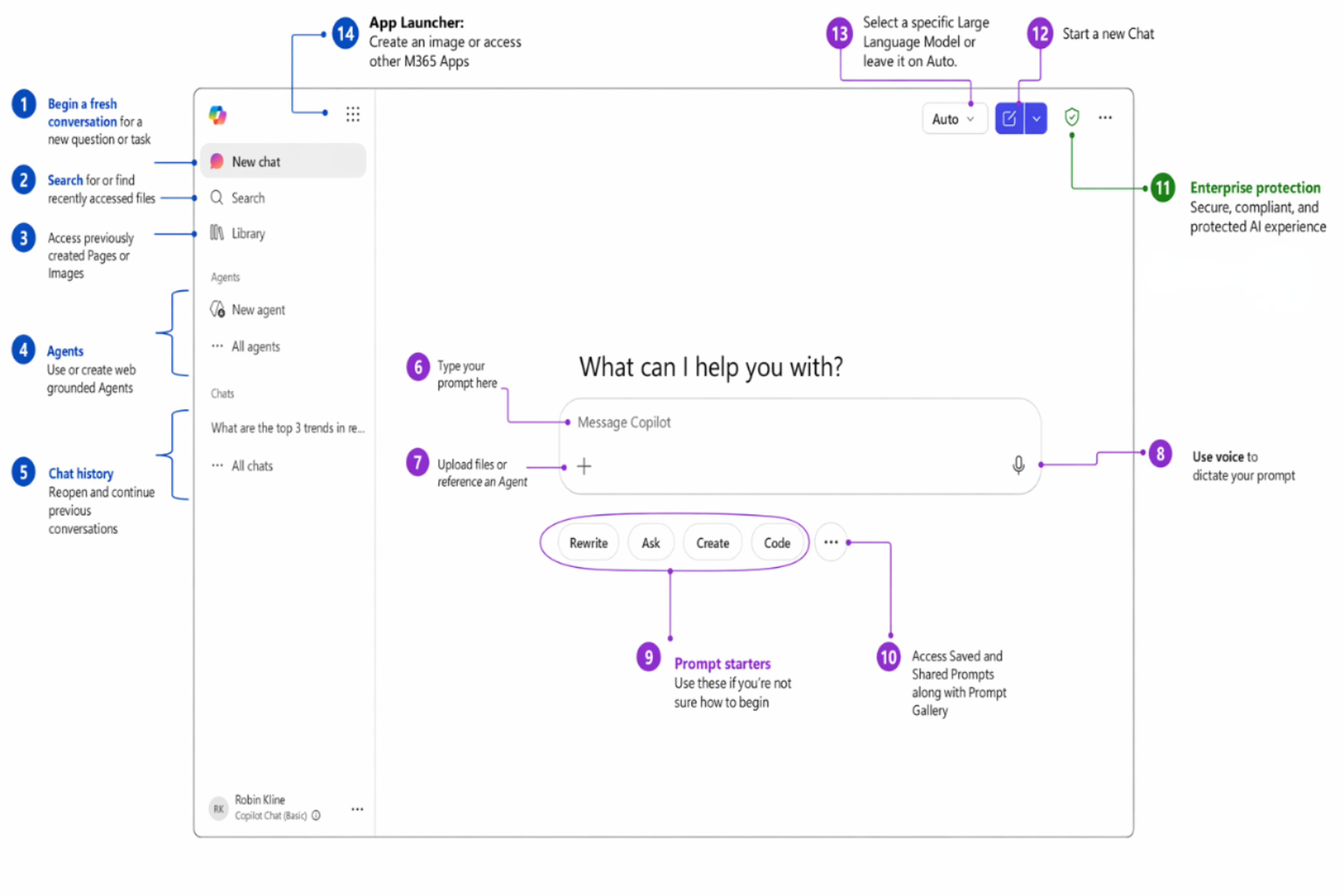
Copilot Chat is a secure AI chat experience available at no additional cost for Entra account users with eligible Microsoft 365 subscriptions. It's grounded in web data and protected by Enterprise Data Protection (EDP).
Where to access Copilot Chat
The Capabilities
Capabilities at a glance
Every feature below is available to you today with your existing Microsoft 365 subscription. Click any card to see an example prompt.
Personalization & Customization
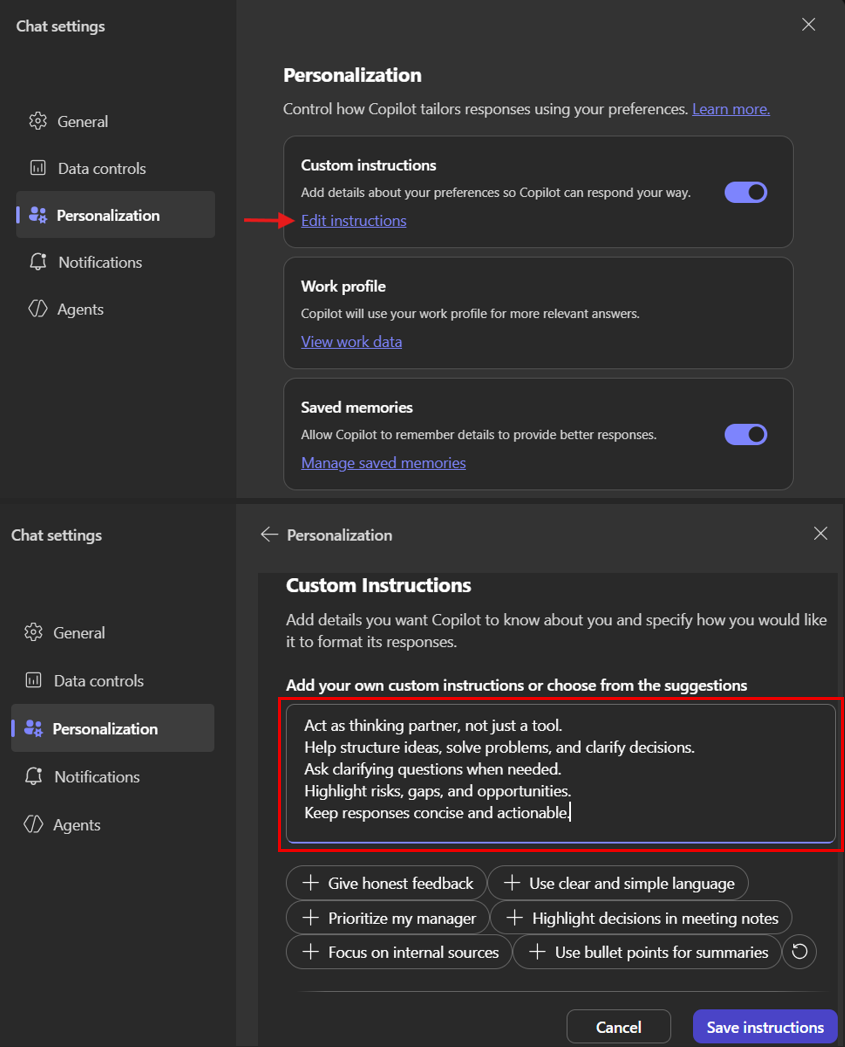
Custom Instructions
Tell Copilot how you want it to respond — every time, automatically
Custom instructions let you set persistent preferences that apply to every conversation. Think of it as training Copilot on your working style — you set it once, and every response reflects your preferences.
How to set up:
- Click the ⋯ menu (top right) → Settings
- Go to Personalization
- Toggle on Custom instructions and click Edit instructions
- Type your preferences or click the suggested chips to add common ones
- Click Save instructions
Saved Memories
Copilot remembers details you share to personalize future responses
Memories let Copilot learn context about you over time — your accounts, your role, your goals — so it can give more relevant answers without you repeating yourself every conversation.
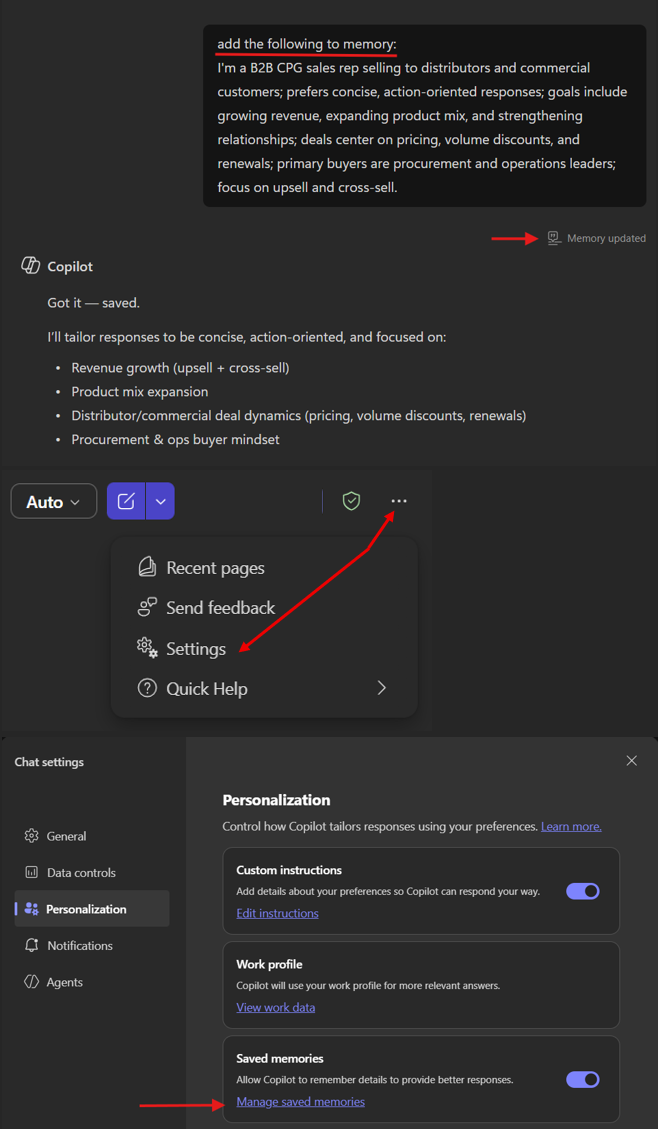
How to add a memory:
- In any chat, tell Copilot: "Add the following to memory: [your context]"
- Copilot will confirm with a "Memory updated" indicator
- Future conversations will automatically use this context
How to manage memories: Go to ⋯ menu → Settings → Personalization → Manage saved memories to review, edit, or delete what Copilot remembers.
Core Chat
Web-grounded Q&A
Ask questions answered from internet data in real time
Multi-turn Conversations
Refine and build on answers across follow-up messages
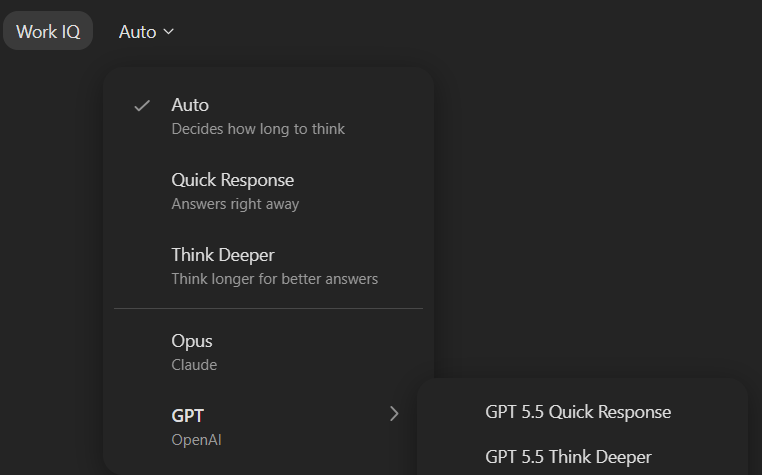
Model Selection
Choose between Auto, Quick Response, or Think Deeper modes
Summarize Content
Paste any text and get a structured summary instantly
Rewrite & Improve
Polish your writing for clarity, tone, and impact
Translate
Translate content between languages
• Always sound the horn at intersections and blind corners.
• Keep a safe distance from pedestrians and never allow riders.
• Lower the forks fully before traveling and watch your overhead clearance.
• Report any damaged pallets or leaking product to your shift lead immediately.Click to copy
Files & Content
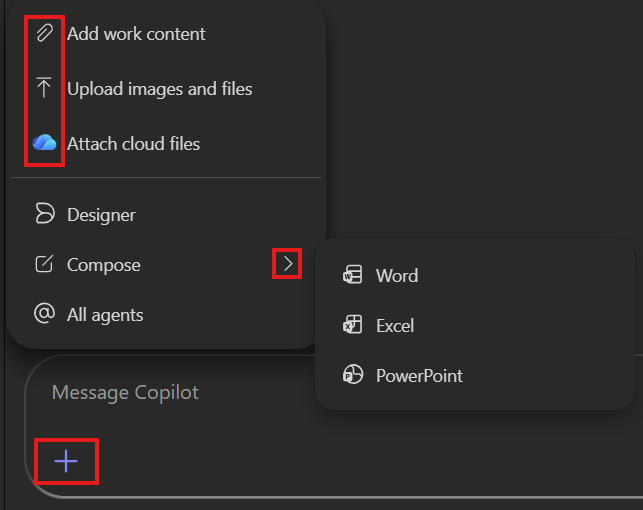
Upload Files
Upload documents, images, or data files via the '+' button for analysis
Reference Files (ContextIQ)
Type '/' to select files from your Microsoft 365 content
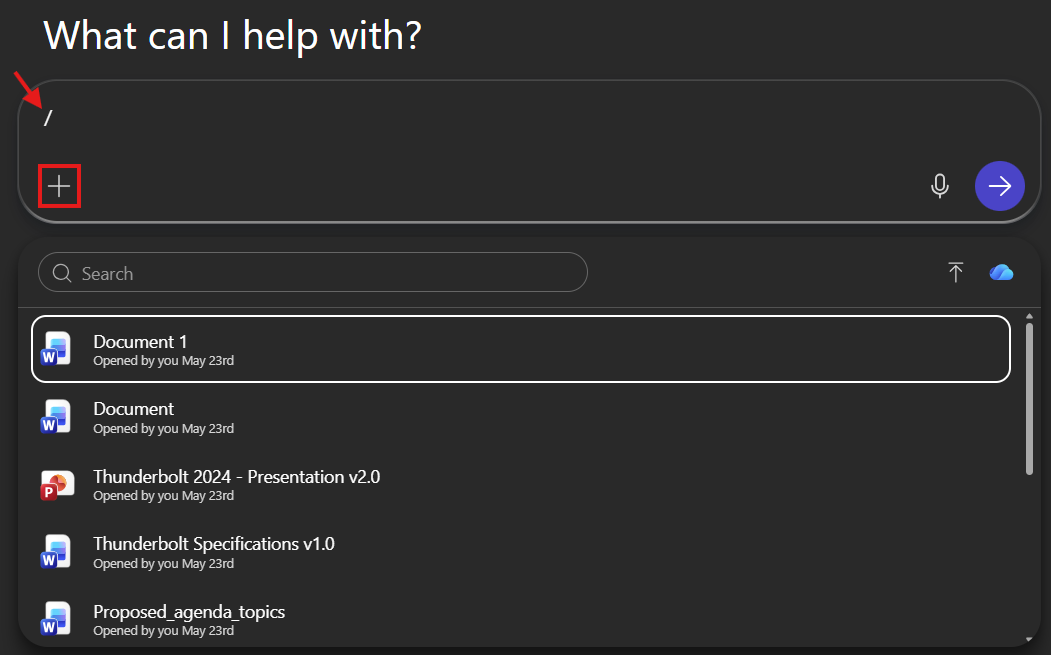
Image Generation
Create images from text descriptions
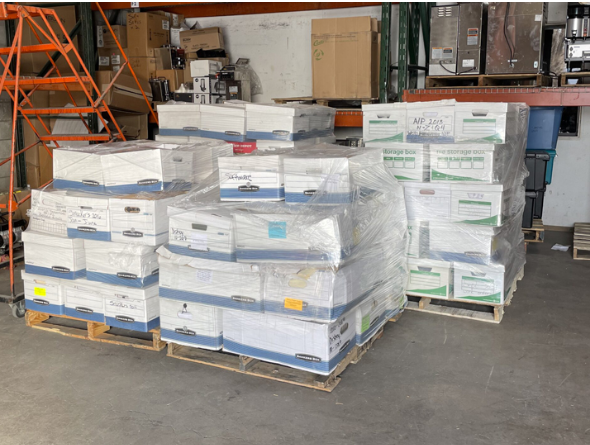
Image Analysis
Upload images and ask questions about them
 Click to copy image
 Copilot Pages
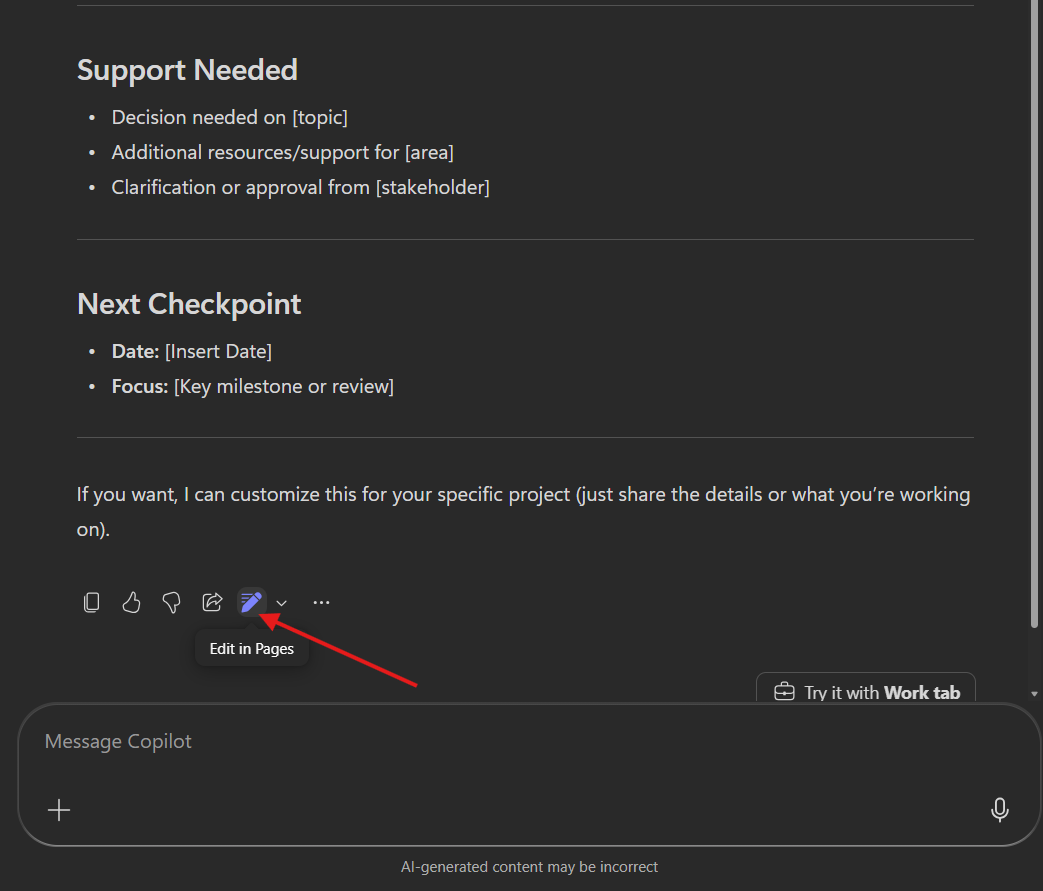
Create Pages
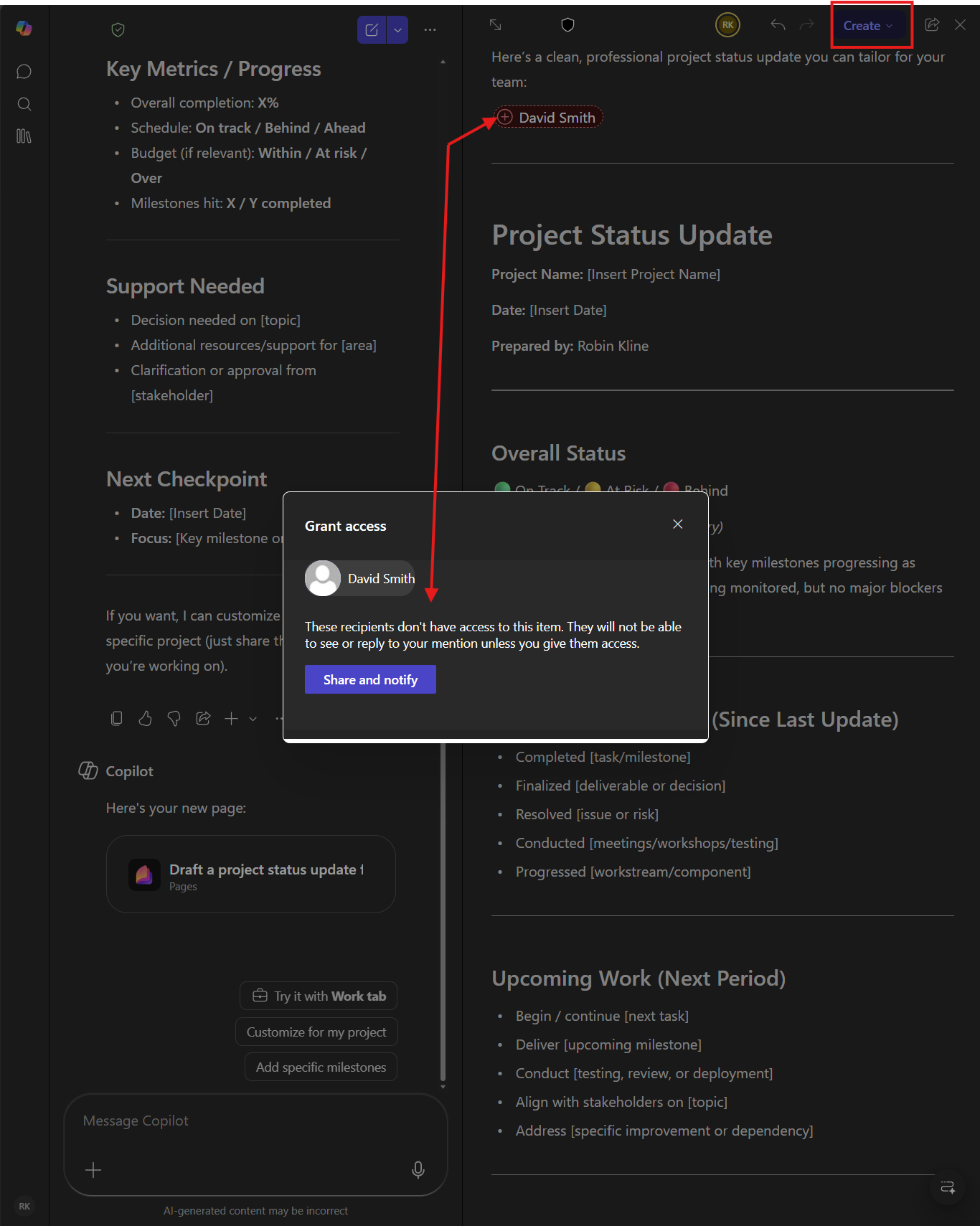
Convert any Copilot response into an editable, shareable document
Then click "Edit in Pages" on the response
Collaborate on Pages
Share Pages with colleagues for real-time co-editing
Share any Copilot Page with your team for real-time collaborative editing — just like a shared document.
Copilot in your everyday apps
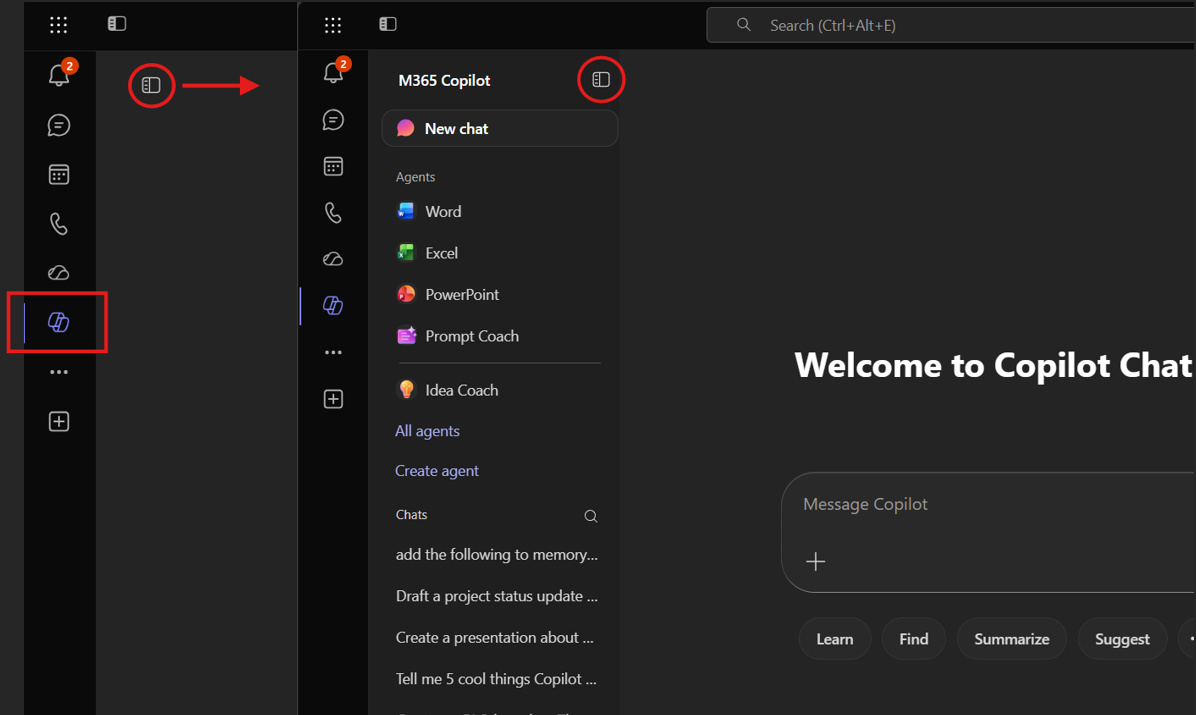
Chat in Teams
Copilot Chat opens in the Teams left nav, aware of your open chat or channel
Chat in Outlook
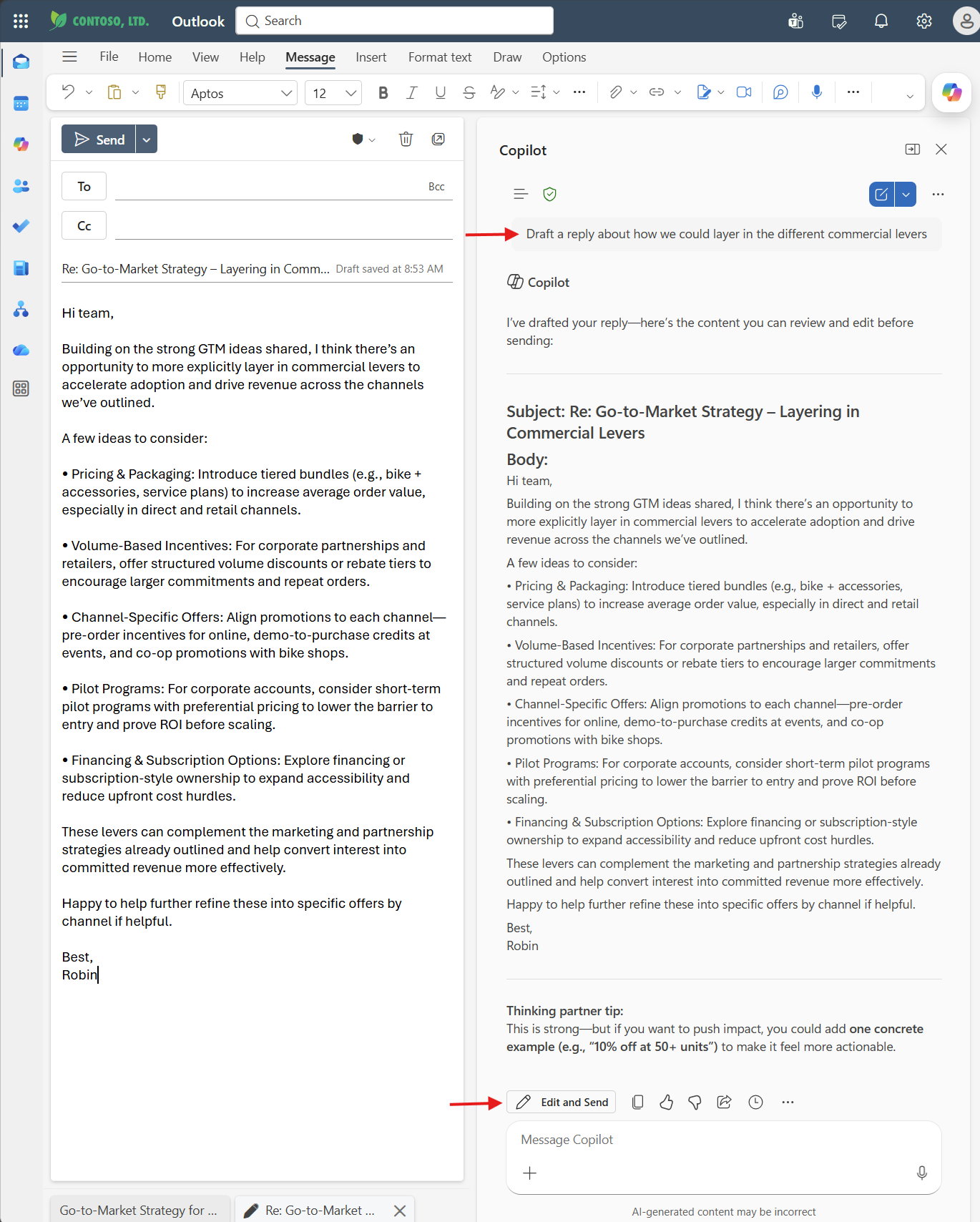
Copilot Chat opens alongside your email — summarize threads, get insights, and draft replies
Copilot in Outlook reads your full email thread for context, so you can work faster with short, natural prompts. Here's the workflow from inbox to reply:
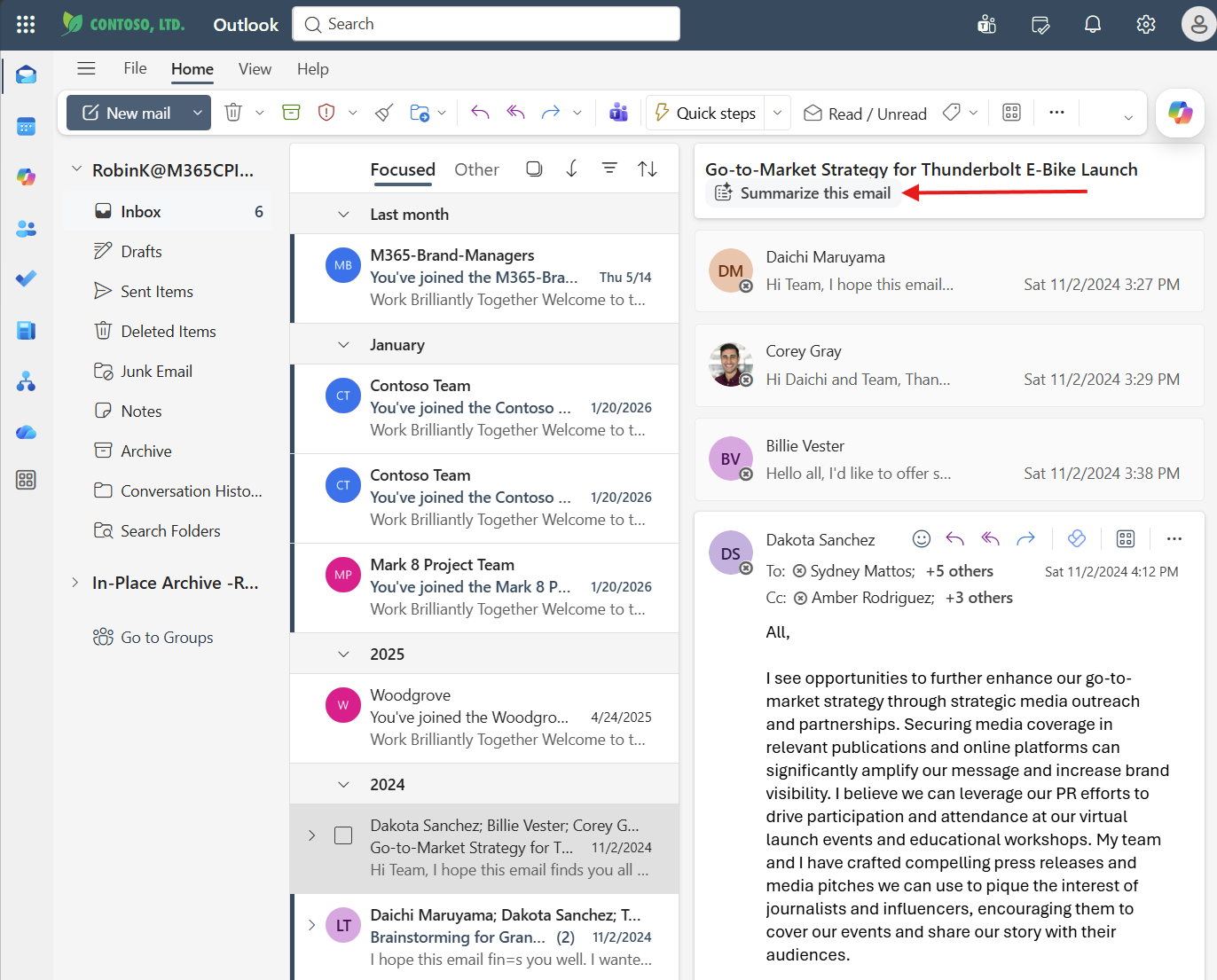
1. Summarize an email thread
Long email threads pile up fast. Click "Summarize this email" at the top of any conversation to get a structured overview in seconds — no prompt required.
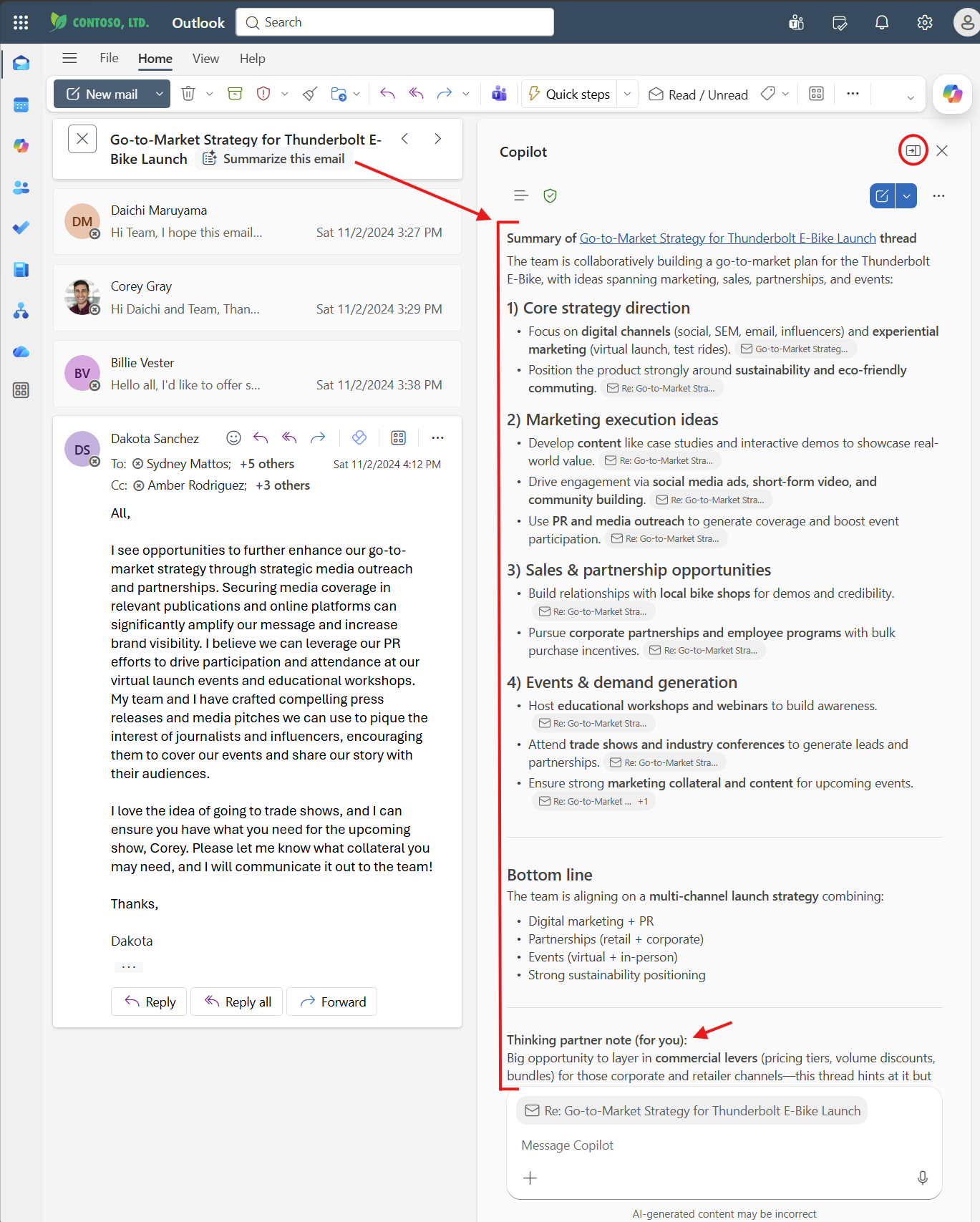
2. Get thread insights & coaching
Copilot doesn't just summarize — it organizes the thread into structured categories with source citations linking back to the original emails. Look for the "Thinking partner note" at the bottom where Copilot proactively surfaces opportunities you might have missed.
3. Draft a reply with Copilot
Tell Copilot what you want to say and it drafts the full reply in context. Review the response, click "Edit and Send" to finalize, and you're done. Copilot even adds a thinking partner tip to strengthen your message.
Agents
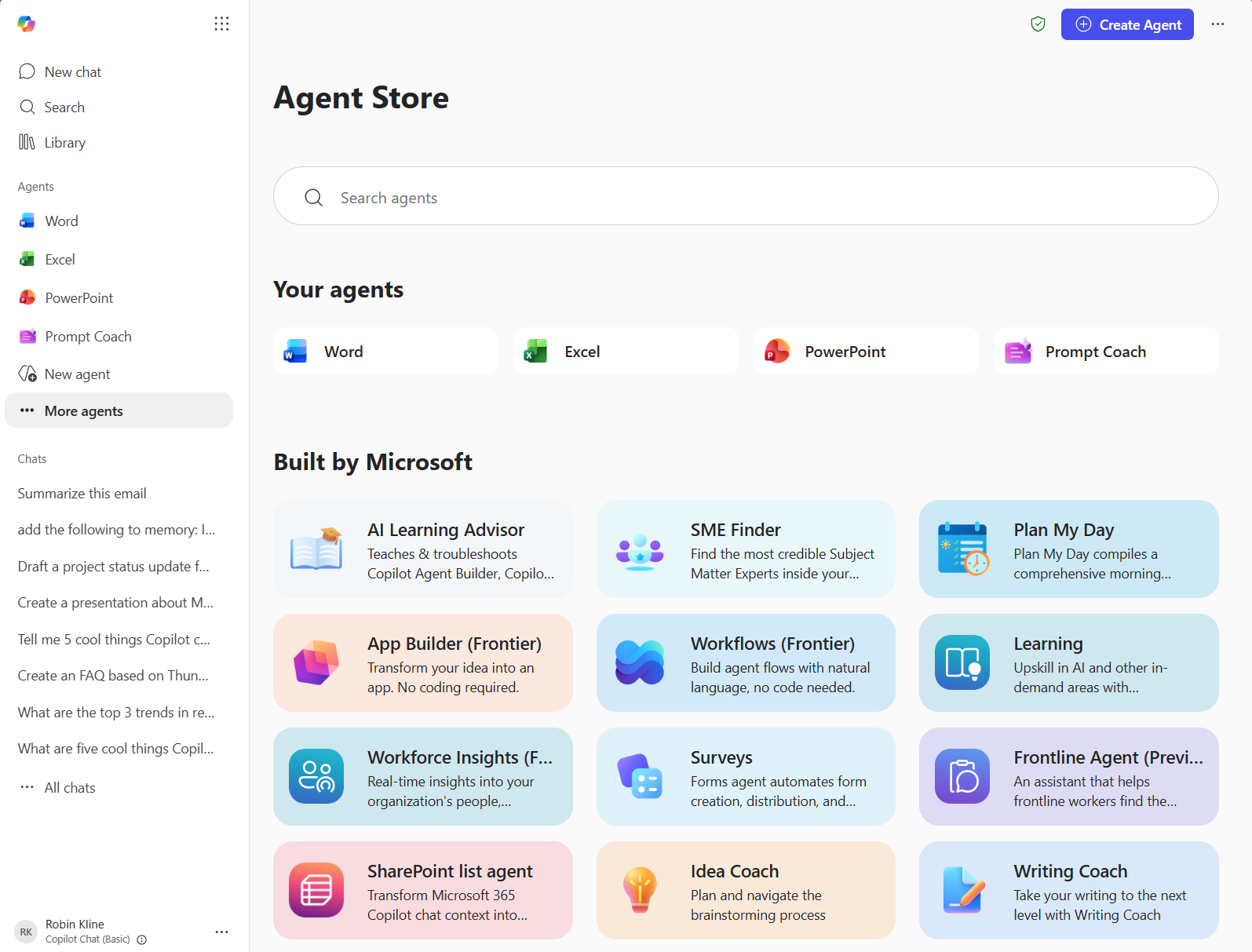
Browse Agents
Access a catalog of prebuilt agents from the sidebar
Open More agents in Copilot Chat to explore the Agent Store. Start with your pinned app agents, then browse Microsoft-built agents for specialized tasks like research, planning, writing, and learning.
App Agents
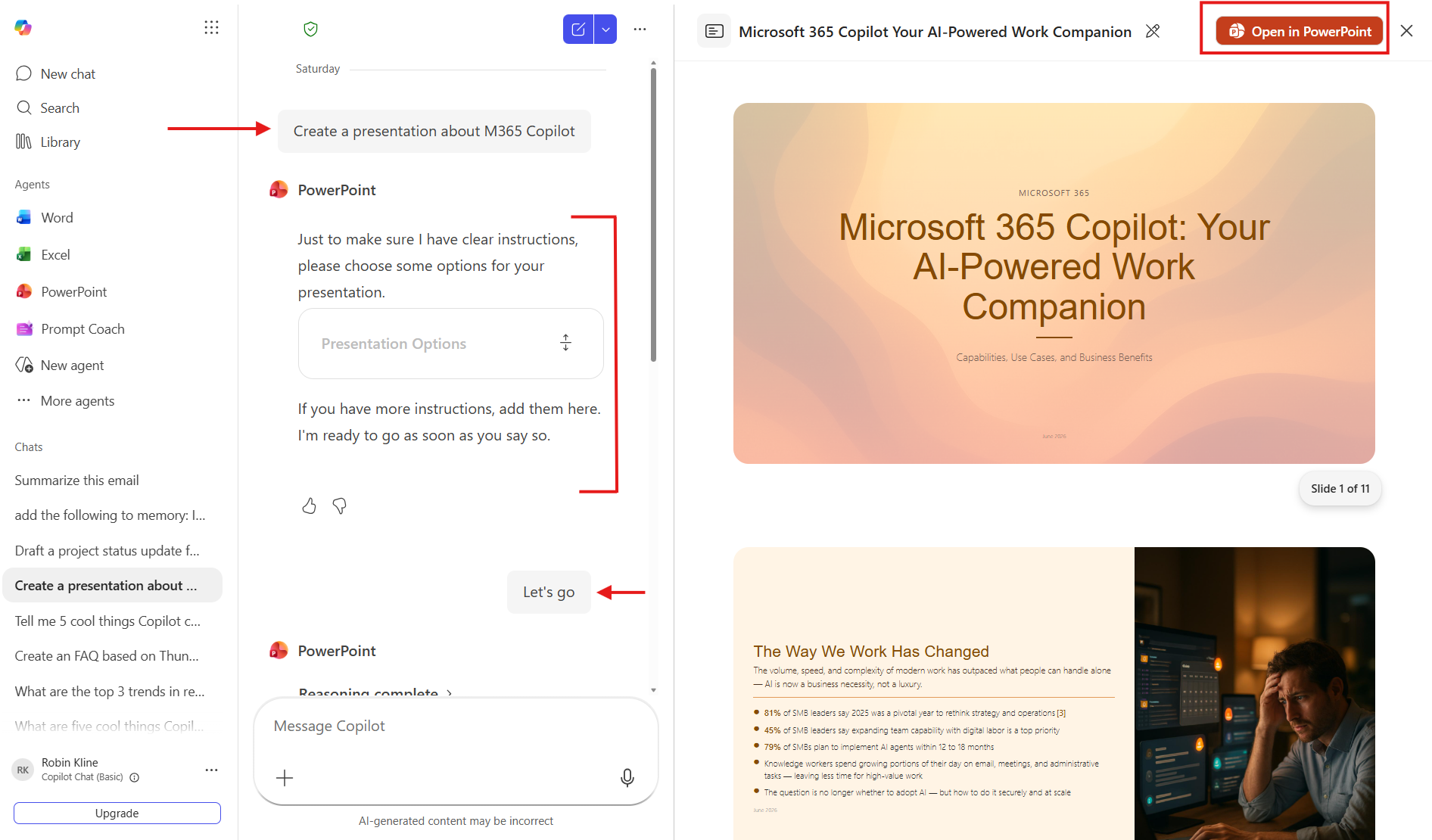
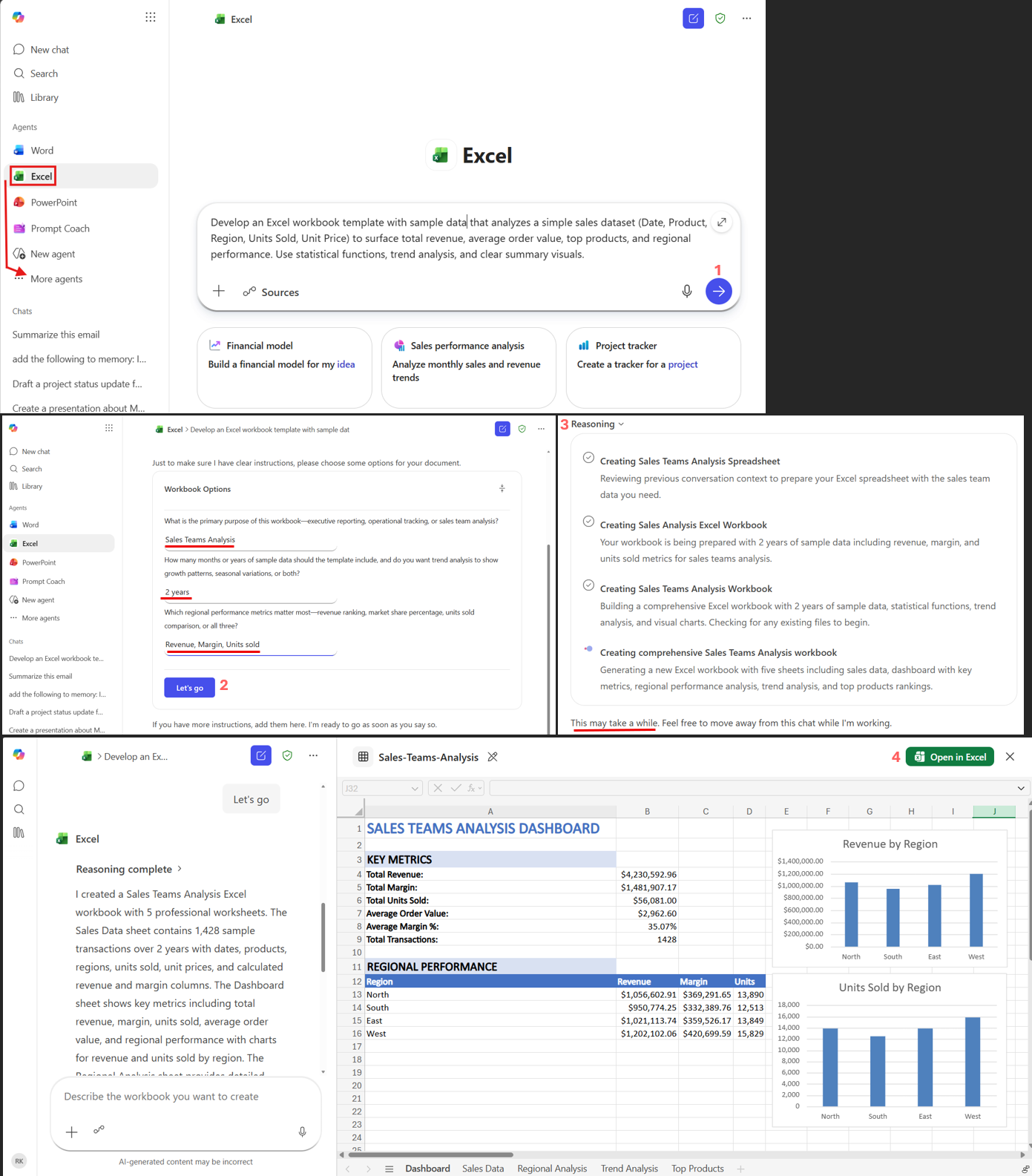
Word, Excel, and PowerPoint agents available in the M365 Copilot app
Access specialized agents for Word, Excel, and PowerPoint directly from the Microsoft 365 Copilot app. These agents can clarify your intent, generate a draft artifact, and hand it off to the full Office app when you are ready to keep editing.
Copilot Search
Universal Search
Search across all your Microsoft 365 data and connected sources
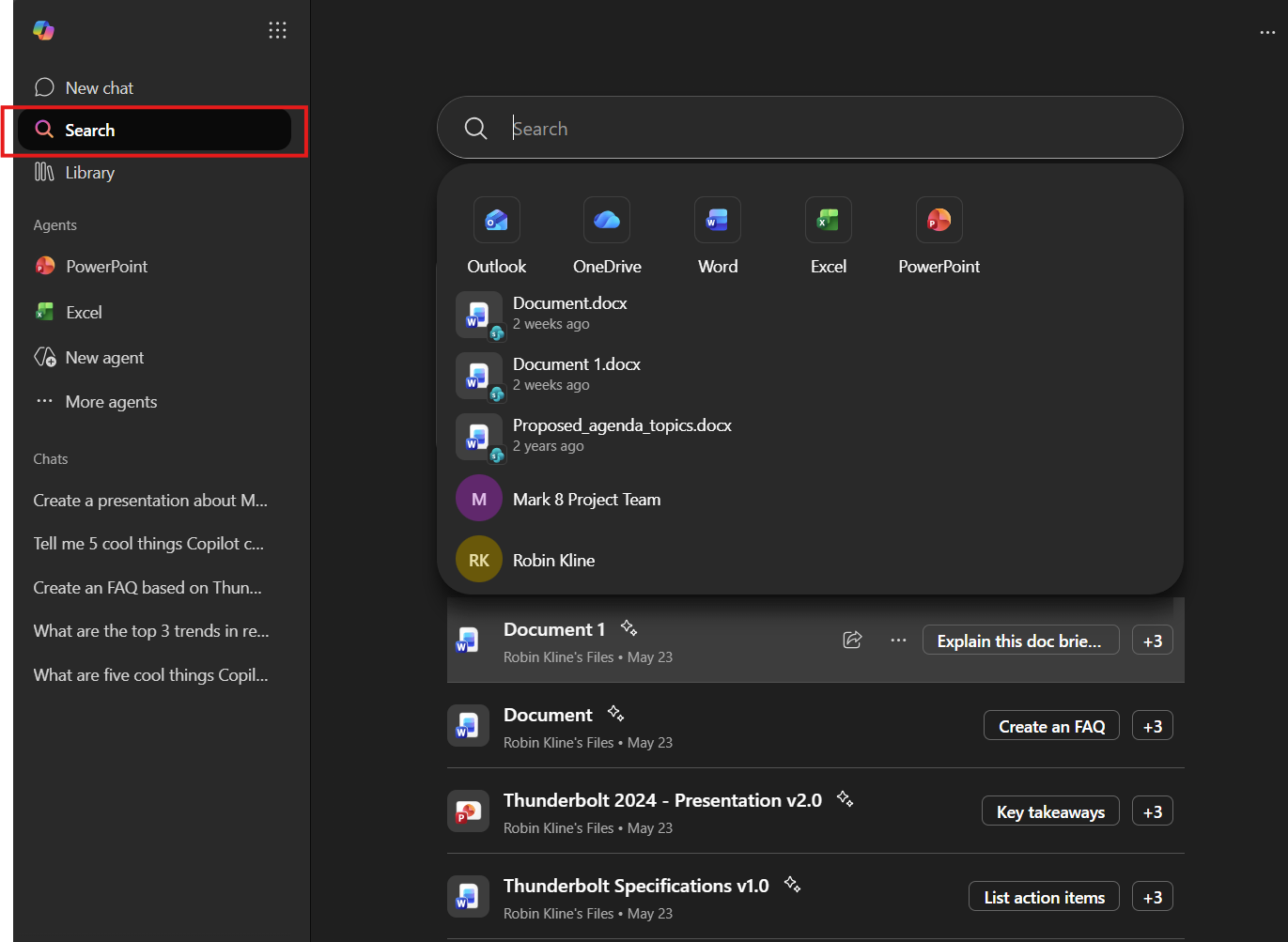
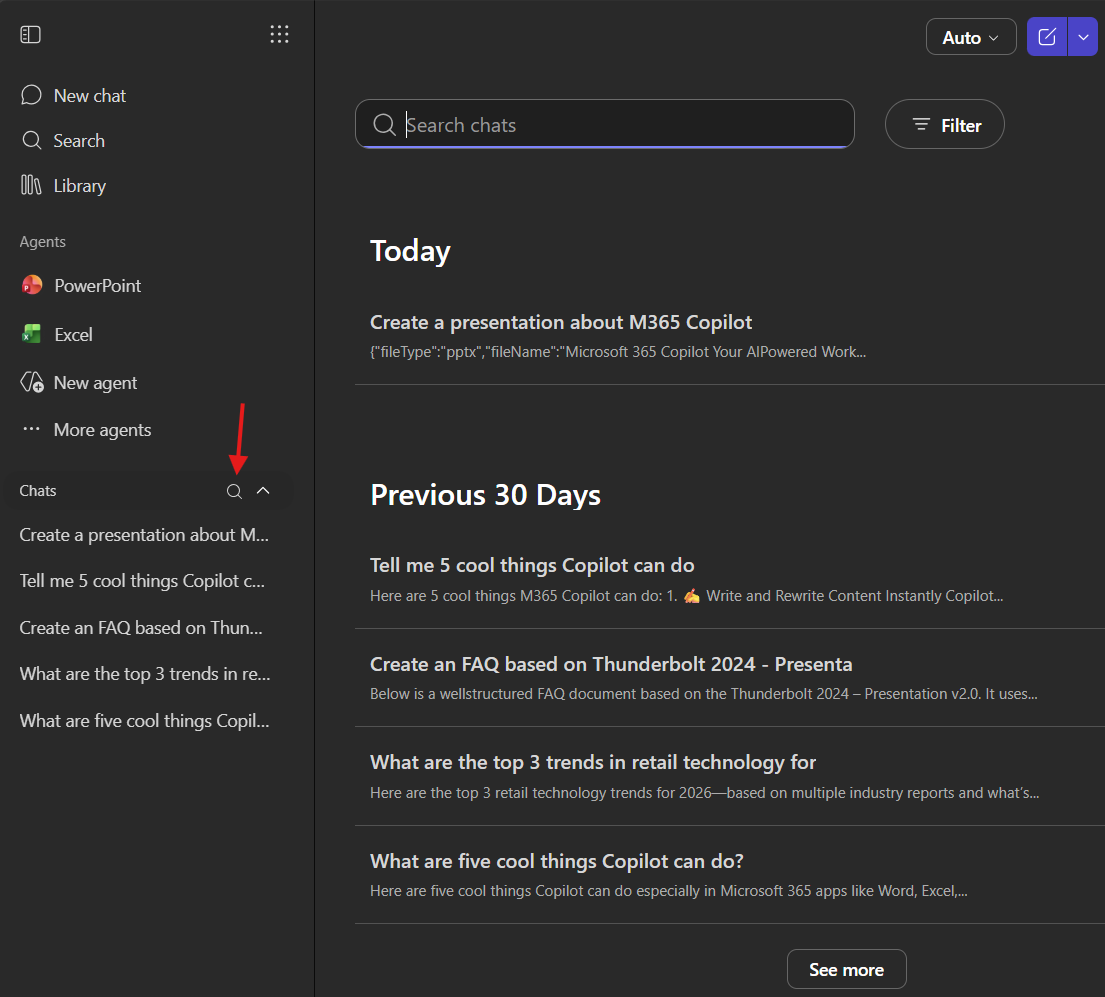
Search → Chat
Start with a search query, then continue into a deeper chat exploration
Begin with a search to find what you need, then continue the conversation in chat to analyze, summarize, or build on the results.
The Framework
The prompting framework
The quality of Copilot's output depends on how you ask. Use the GCSE framework — four ingredients that turn a vague request into a powerful prompt.
Watch a prompt evolve
The same task — three levels of detail. Notice how each version layers in more GCSE elements.
Power techniques
Six strategies that turn good prompts into great ones. Click any card to expand.
Keep the Conversation Going
Don't start over — build on what Copilot gave you with follow-up prompts.
Give Specific Instructions
Tell Copilot what to include AND what to leave out.
• Fill rate: 97.8% (target 98%)
• On-time delivery: 95.4% (target 97%)
• Documented cost savings: $312K YTD from SKU consolidation
• Backorders reduced 28% vs. Q1
• Vendor-managed inventory live in 25 of 200 storesClick to copy
Break It Into Steps
Don't cram everything into one prompt — break complex tasks into stages.
Assign a Persona
Tell Copilot who to 'be' for more specialized, targeted answers.
Use Templates of Good
Give Copilot an example document to follow for structure and tone.
Ask Copilot What It Needs
When you're stuck, let Copilot help you write the prompt.
Try it yourself
Read each scenario, write your own prompt, then click to see our suggestion.
Customer Meeting Follow-Up
You're a Bunzl account manager who just finished a 45-minute meeting with a regional grocery chain's procurement lead about consolidating more of their packaging and janitorial supply spend with Bunzl. You discussed pricing on a consolidated assortment, adding two new compostable product lines, and a vendor-managed inventory pilot for Q3.
Competitive Landscape Brief
Your regional sales director asked you to brief the team on how three competing distributors are positioning their value propositions in the foodservice packaging and janitorial supply market. You have 30 minutes before the sales huddle and no existing research.
Quarterly Business Review Deck
You need to create a one-page executive summary for a grocery customer showing the value Bunzl delivered this quarter — including documented cost savings, fill-rate performance, and SKU consolidation. It needs to be polished enough to share with their VP of Supply Chain. You'll paste in the actual figures.
Quick-reference cheat sheet
- Let it interview you — For complex or context-heavy prompts, ask Copilot to pose 5 clarifying questions before it answers. Answering them sharpens the goal and produces a far better result.
- Break it down — Multi-step prompts beat single complex ones. Review and refine between steps.
- Assign a persona — "Act as a..." instantly sets expertise level and tone.
- Ask what it needs — When stuck, ask Copilot what context would help most.
- Think end-to-end — Don't just create a table of action items; write the whole follow-up email that includes the table.
- Experiment — Try different structures, tones, and follow-ups. Curiosity reveals new capability.
- Iterate always — Your first result is a draft, not a final answer. Refine, adjust, repeat.
The Scenarios
Day-in-the-life scenarios
Explore how different roles use Copilot Chat throughout their day.
-
Morning Briefing
Paste overnight news articles into Copilot and get an instant briefing.
Summarize the top 5 news stories from today related to the foodservice packaging and distribution industry, grocery and convenience-store retail trends, and supply-chain or commodity cost shifts (resin, paper, freight). Focus on anything involving major North American distributors or our customers, single-use plastics regulation, or sustainability mandates. Format as a numbered list with one sentence per story and a brief 'why it matters for Bunzl' note for each.Click to copy -
Meeting Prep
Upload a board deck and prepare for tough questions.
I'm the VP/GM of a Bunzl distribution division preparing for our quarterly executive leadership meeting. Our key metrics this quarter: [e.g., $320M revenue, 9% YoY growth, 97.5% fill rate, 22 new accounts won]. Create 5 talking points that address: year-over-year revenue growth by customer segment (grocery, food processor, c-store, retail), gross-margin and true case-cost trends, fill rate and on-time delivery vs. SLA, new-account wins and at-risk renewals, and our warehouse capacity and automation plan for H2. Keep the tone confident and data-driven. Format as a bulleted list with bold headers.Click to copy -
Communication
Draft company-wide communications quickly.
Draft an email to our field sales organization announcing the launch of a new vendor-managed inventory (VMI) program for convenience-store accounts in the Southeast region. The audience is account managers, regional sales managers, and our customer service team. Strike a tone that's energizing but clear — explain why we're rolling out VMI, what it means for their accounts, and what support and training they'll receive. Keep it under 300 words with a clear call-to-action to attend a kickoff webinar.Click to copy -
Strategic Thinking
Use Think Deeper for complex competitive analysis.
Think deeper: Sustainability mandates and single-use plastics regulations are accelerating across the states our customers operate in, and more customers are asking for compostable and recycled-content alternatives. Analyze what this trend means for Bunzl's distribution business over the next 12 months. Consider product assortment and sourcing implications, true case-cost and margin trade-offs, our advantage as a material-agnostic distributor, customer-retention leverage, and where we should invest to lead on sustainable alternatives. Format as a structured analysis with headers for each area.Click to copy
-
Team Standup Prep
Generate a structured agenda in seconds.
Create an agenda for a 15-minute Monday morning huddle with my team of 8 account managers covering grocery and convenience-store customers. Include sections for: last week's wins (new accounts won or cost-savings delivered), this week's priorities (customer business reviews, site visits, or VMI rollouts), and any blockers needing escalation (backorders, pricing issues, service complaints). Format as a reusable template. Keep each section to 2-3 bullet points max.Click to copy -
Documentation
Turn meeting transcripts into structured action items.
I just finished a 45-minute joint business planning session with the [e.g., Kroger] procurement lead about their packaging and janitorial supply program. Here are my notes from the meeting: [paste your meeting notes here]. Transform these into a professional meeting summary with three sections: Key Decisions Made (table format), Action Items (table with Owner, Task, Due Date columns), and Open Questions for the Next Review (bulleted list).Click to copy -
People Management
Build feedback templates and development plans.
I'm a regional sales manager preparing for quarterly performance reviews with my team of [e.g., 8] account managers covering [e.g., grocery and convenience-store] customers. Create a structured feedback template tailored to distribution sales that includes: Sales Performance & Impact (3 bullets covering revenue/quota attainment, new accounts won, and cost savings delivered to customers), Growth Opportunities (2 bullets with specific development actions like customer business-review skills or category/VMI knowledge), Goals for Next Quarter (3 measurable goals tied to revenue, account retention, and customer satisfaction), and a Coaching Notes section. Use a supportive and growth-oriented tone.Click to copy -
Reporting
Synthesize raw data into executive summaries.
Create a Q2 territory performance summary for my VP of Sales. Our team of [e.g., 8] account managers covers [e.g., 1,200] grocery and convenience-store customers across the [e.g., Midwest] region. Here are our key numbers: [paste your quarterly metrics or upload your performance spreadsheet]. Include sections for: Key Metrics (format as a table with Metric, Target, Actual, % to Goal columns — include metrics for revenue, fill rate, new accounts won, and cost savings delivered), Top Achievements (3-4 bullets highlighting specific account wins), Challenges & Mitigations (2-3 bullets about competitive threats or service gaps), and Priorities for Q3 (numbered list). Keep the tone professional and results-focused.Click to copy
-
Email Triage
Quickly categorize a large inbox by priority.
I have [e.g., 40+] unread emails from the past 3 days related to my customer accounts, supplier communications, and internal updates. Here are the subject lines and senders: [paste your email subject lines and senders here]. Categorize them into three priority tiers: 🔴 Respond Today (customer order issues, backorder alerts, pricing requests), 🟡 Respond This Week (business-review scheduling, new item setup requests, supplier check-ins), and 🟢 FYI Only (corporate newsletters, HR updates, training announcements). Format as a table with columns for Priority, Subject, Sender, and Suggested Action.Click to copyNo inbox handy? Copy this sample list:• “Backorder on can liners — need ETA” — Dana Ruiz, FreshMart Grocery
• “Q3 business review scheduling” — Tom Albright, Regional Account Mgr
• “Pricing request: compostable clamshells” — Priya Shah, Coastal Foods
• “New item setup — nitrile gloves” — Product Onboarding (internal)
• “Invoice discrepancy #44821” — Marcus Lee, Accounts Payable
• “Lunch & Learn: sustainable packaging” — Corporate Comms
• “Delivery missed at DC 12 dock” — Sam Carter, Warehouse Lead
• “Open enrollment reminder” — HR BenefitsClick to copy -
Research
Run fast competitive analysis across tools and vendors.
I'm preparing for an account review with the procurement lead at [e.g., FreshMart Grocery]. Using publicly available information, compare how Bunzl and our top 2 distribution competitors — [e.g., Veritiv and Imperial Dade] — position our offerings in foodservice packaging and janitorial supply. Create a comparison framework with columns for Company, Market Focus, Service Model, Sustainability Positioning, and Potential Weakness. End with 3 talking points on why consolidating more spend with Bunzl would lower their true case cost.Click to copy -
Content Creation
Draft long-form content with specific audience targeting.
Write a compelling one-page sales story for my top prospect — [e.g., a 50-store regional grocery chain] that currently uses several different suppliers. Target audience: the VP of Procurement who values cost savings and supply reliability. Include sections for: Why Bunzl (3 bullets on single-source consolidation, our 60,000+ item assortment, and our nationwide distribution footprint), Customer Impact (2 bullets on lowering true case cost and freeing up working capital), and Service & Support (3 bullets on vendor-managed inventory, fill-rate performance, and sustainable product alternatives). Use a professional, consultative tone. Keep it under 400 words.Click to copy -
Document Review
Get AI-powered analysis of proposals and reports.
Review the attached supply proposal for our Q3 [e.g., Kroger] program and provide structured feedback. Identify: 3 strengths of the proposal, any gaps in the cost-savings projections (missing line items, unrealistic assumptions, or incomplete service-level detail), suggestions to strengthen the executive summary for the customer, and any risks around implementation timing or inventory readiness that aren't addressed. Format your feedback as a table with columns for Section, Finding, and Recommendation.Click to copy
-
Shift Prep
Generate opening checklists customized to your location.
Create a comprehensive shift-opening checklist for a warehouse supervisor at a distribution center. Include sections for: Safety & Compliance (4 items — check forklift inspections, verify clear aisles and dock areas, confirm PPE availability, review any open incident reports), Inbound & Putaway (4 items — verify overnight receipts, check for damaged pallets, confirm putaway locations, flag temperature-sensitive items), Outbound & Pick N Pack (3 items — review today's order volume, confirm staffing by zone, check for backorders or substitutions), and Communication (3 items — brief the team on priorities, note any equipment issues, log the shift handoff). Format each item as a checkbox-style line. Keep the language simple and action-oriented.Click to copy -
Quick Reference
Get instant, customer-friendly explanations of policies.
Draft a simple, customer-friendly explanation of a standard product return and credit policy for distribution customers. Cover these scenarios: damaged product found on delivery, product past its expiration date, product recalled by the manufacturer, and overstock or discontinued items. Format as a quick-reference card with each scenario as a separate section including What to Do and Who to Contact. Use a helpful, professional tone I can reference while talking to a customer — and if I paste our actual policy, tailor it to match.Click to copy -
Incident Reporting
Draft structured incident reports quickly on the floor.
Help me write a warehouse incident report. Details: At [e.g., Distribution Center #12] today, [describe what happened, e.g., a loaded pallet shifted off a forklift in the outbound staging area]. [describe any injury or damage, e.g., no injuries, but two cases were damaged and an aisle was blocked for about 20 minutes]. I spoke with [who was involved, e.g., the forklift operator and the shift lead] about what happened. Format the report with sections for: Incident Summary, Location/Date/Time, What Happened, People Involved, Injuries or Damage, Immediate Actions Taken, Photos Needed (leave blank), and Recommended Follow-Up to prevent recurrence.Click to copy -
Training
Create on-the-go training guides for new processes.
I'm writing a training guide for our warehouse team on a new handheld scanning and pick-verification process. Create a clear step-by-step guide a team member can follow on the floor. Include: equipment and login requirements, how to start a pick assignment, how to scan and verify items against the order, how to flag a short-pick or substitution, how to report a damaged item with a photo, and how to close out and confirm an order for shipping. Use numbered steps with brief descriptions. Keep each step to 1-2 sentences max.Click to copy
Getting Started
Getting started checklist
Complete these milestones to build your Copilot Chat confidence. Your progress is saved automatically.
- Open Copilot ChatVisit m365copilot.com and sign in with your work account
- Verify the green shieldLook for the green EDP shield in the top right — it means your data is protected
- Ask your first questionTry a web-grounded prompt like "What are the latest trends in my industry?"
- Upload a documentClick the '+' button and upload a PDF or Word doc, then ask a question about it
- Use the '/' shortcutType '/' in the prompt box to reference a file from your Microsoft 365 content
- Try different modelsSwitch between Auto, Quick Response, and Think Deeper to see how answers change
- Generate an imageAsk Copilot to create an image for a presentation or team communication
- Create a Copilot PageClick 'Edit in Pages' on a response you like to turn it into a shareable document
- Try Copilot in Teams or OutlookOpen Copilot Chat from the left nav in Teams or the side pane in Outlook
- Explore an agentBrowse the agent catalog from the sidebar and try a prebuilt agent
You're ready to go
You've explored the features, learned the framework, and practiced your prompts. Time to put it all to work — and take a pocket reference with you.